

How to Choose the Right TV Wall Mount for Your TV

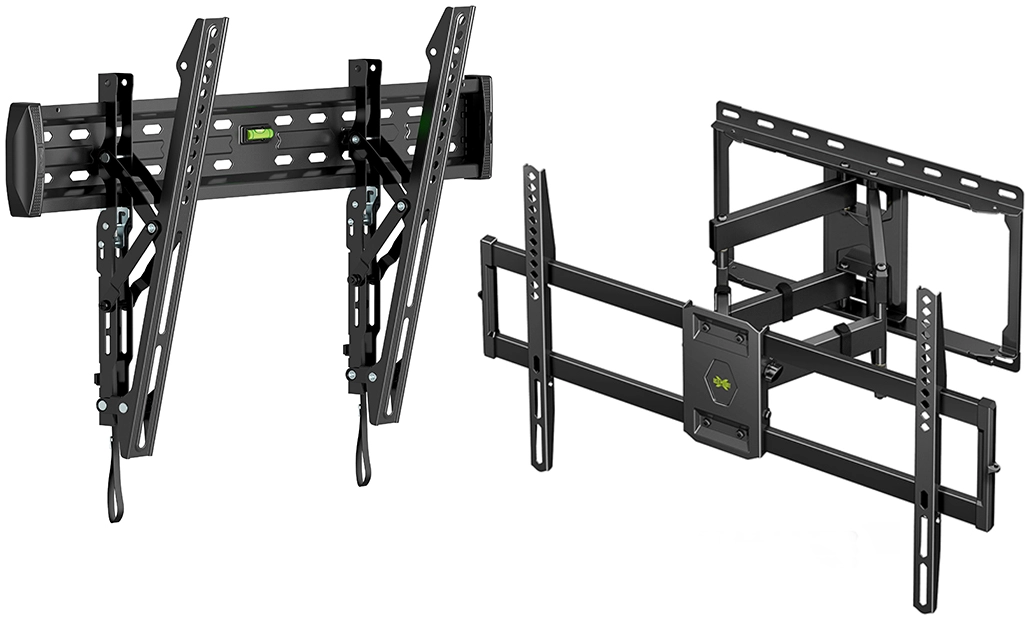
Choosing a TV wall mount is not simply about finding a bracket that fits the size of your television. The mount also needs to support the TV’s weight, match its VESA mounting pattern, suit the viewing position, and be appropriate for the wall where it will be installed.
Different mounting brackets provide different levels of movement. A fixed mount keeps the screen close to the wall, a tilting mount allows the viewing angle to be adjusted vertically, and a full-motion mount provides greater flexibility for changing the direction of the screen.
Before buying a TV wall mount, it is worth checking your television specifications and considering how you use the room. Choosing the right bracket from the beginning can make the installation easier and help create a more secure and practical setup.
What Should You Check Before Buying a TV Wall Mount?
There are several important specifications to check before choosing a mounting bracket. The most important are your TV’s screen size, weight, VESA pattern, and the type of movement you want.
The wall itself also matters. A bracket that is suitable for one type of wall may require a different installation approach on another surface, particularly with gypsum board, marble, or decorative wood-panel walls.
You should also think about the viewing position. If everyone normally watches the TV from directly in front of it, a fixed bracket may be sufficient. If the viewing position changes, a tilting or full-motion mount may be more practical.
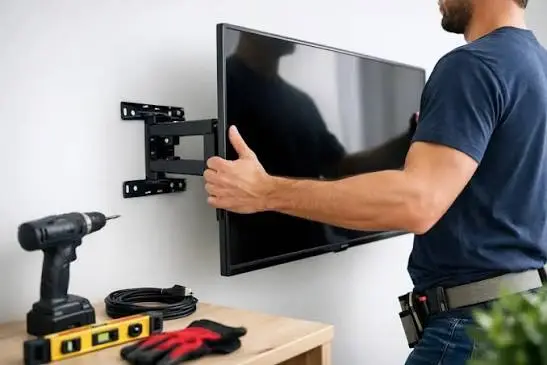
Check Your TV’s Screen Size
TV wall mounts are generally designed to support specific ranges of screen sizes. A bracket may be advertised for televisions from a particular minimum to maximum size, so the TV’s diagonal screen measurement should be checked before purchasing.
However, screen size should not be the only specification you consider. Two televisions with the same screen size can have different weights and mounting patterns, so the bracket needs to satisfy all relevant requirements.
For larger televisions, it is particularly important to select a mount that is designed for the screen rather than choosing based on size alone.
Check the TV’s Weight
Every TV wall mount has a maximum weight capacity. Your television should be comfortably within that limit rather than exceeding or sitting right at the bracket’s maximum rating.
Check the manufacturer’s specifications for the weight of your TV without the stand, since the stand is normally removed when the television is wall mounted.
Large-screen televisions can be considerably heavier and more difficult to handle during installation. This is one reason that larger TV installations require more care when lifting, positioning, attaching, and leveling the screen.
What Is VESA Compatibility?
VESA refers to the standardized spacing between the mounting holes on the back of a television. These holes are used to attach the TV to a compatible wall mount.
VESA measurements are normally expressed in millimeters, such as 200 × 200, 400 × 400, or 600 × 400. The first number represents the horizontal spacing and the second represents the vertical spacing between the mounting holes.
Before buying a bracket, check your TV’s VESA pattern and make sure it falls within the mount’s supported range. If the VESA pattern does not match, the bracket may not be suitable even if the screen size appears to be compatible.
How Do You Find Your TV’s VESA Size?
The VESA pattern can often be found in the television’s specifications or user manual. Some manufacturers also provide the mounting dimensions on their product support pages.
If you cannot find the information, you can measure the distance between the mounting holes on the back of the TV. Measure horizontally from the center of one mounting hole to the center of the other, then repeat the measurement vertically.
For example, if the horizontal distance is 400 mm and the vertical distance is 400 mm, the TV has a 400 × 400 mm VESA pattern.
What Is a Fixed TV Wall Mount?
A fixed TV wall mount holds the television in a stationary position close to the wall. It is one of the simplest mounting options and is often chosen when the TV will be viewed directly from the front.
Because the bracket generally has little or no movement, it can provide a clean and low-profile appearance. This makes fixed mounts popular for living rooms, bedrooms, offices, and decorative TV walls where the screen is intended to remain in one position.
A fixed bracket may be suitable when you do not need to change the viewing angle after installation.
What Is a Tilting TV Wall Mount?
A tilting mount allows the television to angle vertically after installation. This can be useful when the TV needs to be positioned slightly higher than normal or when viewers need a different vertical viewing angle.
Tilting brackets are commonly considered for bedrooms and certain living-room setups. They can also help reduce reflections from lights or windows when a small adjustment to the screen angle is useful.
Before choosing one, check how much tilt the bracket provides and whether the design still allows access to the cables and connections on the back of the television.
What Is a Full-Motion TV Wall Mount?
A full-motion mount provides more movement than a fixed or tilting bracket. Depending on the design, the television can usually be pulled away from the wall and adjusted from side to side as well as tilted vertically.
This can be useful when the TV needs to be viewed from different seating positions. For example, a television positioned in a room with seating on more than one side may benefit from the additional movement.
Full-motion mounts generally extend farther from the wall, so you should consider the available space behind and around the television before installation.
Which TV Wall Mount Is Best for Your Room?
The best bracket depends on how the television will be viewed rather than simply choosing the mount with the most movement.
A fixed mount can be a good choice for a straightforward setup where the TV stays in one position. A tilting mount can provide additional vertical adjustment, while a full-motion mount is useful when viewers need to change the screen’s direction.
Consider your seating arrangement, room size, viewing angle, furniture placement, and how often you expect to adjust the television before deciding.
How Does Wall Type Affect TV Mounting?
The wall is an important part of the mounting system. Before installing a TV, you need to consider what the wall is made from and where the appropriate fixing points are located.
A standard solid wall may have different requirements from gypsum board, marble, or a wood-panel TV décor. The finished surface and the structure behind it should both be considered before drilling.
This becomes particularly important with larger televisions because the wall and mounting system need to handle the additional load securely.
Can You Mount a TV on a Gypsum Board Wall?
A TV can be mounted on some gypsum board walls, but the installation should take the wall’s construction into account.
The location of studs, framing, reinforcement, and other structural elements can affect where and how the bracket should be attached. The weight and size of the television also need to be considered.
For this reason, you should not assume that every gypsum board wall can support a television in the same way. The wall construction should be assessed before choosing the mounting method. For Professional Advice contact our TV Installation Technician.
What About Marble and Wood-Panel Walls?
Finished surfaces such as marble and wood panels require additional care because drilling can affect both the appearance and the underlying structure.
With a marble TV wall, the position of the mounting points and cable route should be considered before drilling. Wood-panel installations may also form part of a larger decorative structure, so the television should be positioned in relation to the surrounding design.
The mounting bracket still needs to be compatible with the TV itself, while the installation method must also be appropriate for the wall construction behind the finished surface.
How High Should a TV Wall Mount Be?
The correct mounting height depends on the seating position, TV size, viewing distance, and room layout.
For many living-room setups, positioning the center of the screen around the seated viewer’s eye level is a useful starting point. However, furniture height, decorative walls, bedrooms, and other room-specific factors can change the ideal position.
Before drilling, it is worth checking the intended height from the main viewing position rather than simply choosing a fixed distance from the floor.
How Far Should a TV Sit From the Wall?
The distance between the TV and wall depends largely on the type of mounting bracket.
A fixed bracket can keep the television relatively close to the wall, while a tilting or full-motion mount may require additional space because of its design and movement.
When choosing a bracket, consider not only the appearance from the front but also whether there is enough room to connect cables, access ports, and move the screen when required.
Should You Choose a Low-Profile TV Mount?
A low-profile mount can be a good option when you want the television to sit close to the wall.
This type of setup can work particularly well with modern interiors and decorative TV walls where a large gap between the screen and wall may be visually distracting.
However, a very close-fitting mount can make access to the rear connections more difficult. If you frequently connect or disconnect devices, consider whether the convenience of a low-profile installation outweighs the reduced access.
What TV Mount Should You Choose for a Large TV?
Large televisions require particular attention to the mount’s weight capacity, supported screen size, VESA compatibility, and overall construction.
An 85-inch or larger TV can be significantly more difficult to handle than a smaller screen. The bracket needs to be suitable for the television, while the installation itself needs to be carefully planned before the screen is lifted into position.
Large TVs also benefit from accurate leveling because even a small amount of tilt can become noticeable across a large screen.
Common TV Wall Mount Mistakes to Avoid
Following mistakes should be avoided while Mounting a TV On a Wall:
Choosing a Mount Based Only on Screen Size
A mount advertised for your TV’s screen size may still be unsuitable if its weight capacity or VESA range does not match your television.
Always check the complete specifications before purchasing.
Ignoring the Wall Construction
The bracket may be perfectly suitable for the TV but still require a different installation approach depending on the wall.
Check the wall construction and available fixing points before drilling.
Mounting the TV Too High
A television can technically be mounted almost anywhere on a wall, but that does not mean the position will be comfortable for everyday viewing.
Choosing the right TV setup consider the seating position and screen center before deciding where the bracket will go.
Forgetting About Cable Connections
The TV needs enough space for power, HDMI, Ethernet, audio, and other connections that may be required.
Plan the cable route and connected equipment before finalizing the mounting position.
Choosing More Movement Than You Actually Need
A full-motion bracket offers flexibility, but not every room needs it.
If the TV will always be viewed directly from one position, a fixed mount may provide a simpler solution. Choose the movement that solves an actual requirement rather than assuming more movement automatically means a better bracket.
What Should You Check Before Installing the TV?
Before the final installation, check the following:
- TV screen size
- TV weight
- VESA mounting pattern
- Bracket weight capacity
- Supported TV size range
- Wall construction
- Mounting height
- Viewing position
- Cable connections
- Available space around the television
- Movement required from the bracket
Checking these details before installation can prevent many common problems and make the final setup more straightforward.
Should You Buy the TV Mount Separately From the Installation?
You can purchase a TV wall mount separately and have it installed later, provided that the bracket is suitable for the television and wall.
If you are purchasing the bracket yourself, keep the TV specifications available and check the manufacturer’s compatibility information. This is particularly important for large or unusually shaped televisions.
If you are unsure which mount is appropriate, identifying the TV model and its VESA pattern is a good starting point before making a purchase.
How Do You Know Which TV Mount Is Right for You?
Start with the television rather than the bracket. Check its weight, screen size, VESA pattern, and manufacturer’s mounting requirements.
Then consider the room. Decide whether the TV needs to remain fixed, tilt vertically, or move from side to side. Finally, consider the wall construction, viewing height, cable connections, and the amount of space available around the screen.
Once these factors are clear, it becomes much easier to narrow down the appropriate type of TV wall mount.
Final Thoughts
Choosing the right TV wall mount involves more than matching a bracket to the size of your television. Weight capacity, VESA compatibility, wall construction, viewing position, mounting height, and the amount of movement required all play a role in selecting the right setup.
A fixed mount may be ideal for a simple, low-profile installation, while a tilting or full-motion bracket can provide additional flexibility when the room requires it. The best choice is the one that fits both your television and the way you use the space.
If you are planning a wall-mounted TV, take the time to check these specifications before drilling. Proper planning can help create a secure, level, and practical installation that works well with the rest of the room.